SELECTED PROJECTS / 01—04
Tools built
around the work.
Voice interfaces. Live production. The coaching sideline.
A closer look at four projects, through an actual application screen and workflow overviews.
VIEW-ONLY SHOWCASE01 / VOICE & WORKFLOW
Voice agents
Private applicationA spoken conversation connected to useful tools.
The browser-based assistant brings voice, connected email and calendar tools, conversation continuity, and review of external actions into one workflow.
- The work
- Connect a real-time voice interface to tools that can retrieve context and prepare actions.
- The design choice
- Bind approval-gated actions to the specific request and keep an action receipt.
Workflow overview of a private, connected assistant.
Speak. Prepare. Review.
conversation→Context
& tools→Action
review
Architecture summary · no live controls
02 / LIVE PRODUCTION
Production Engineer
Used in Gopher Studios productionMeet Skippy, our livestream Production Engineer.
Skippy runs our Gopher Studios livestream workflow. It’s an example of bringing an assistant into real production work, alongside the video, audio, and broadcast setup.
- The setting
- A live-production environment where the software has to fit the operation.
- The connection
- Technical systems and the people delivering the stream, working toward the same output.
Livestream workflow overview. The operational environment stays private.
Role & signal-path overview · no broadcast controls
03 / COACHING TOOLS
Practice Planner
Built application · PitchPlanStart with the session you actually need to run.
PitchPlan collects the coaching context before a session plan: focus, duration, season phase, equipment, fixture context, and the evening run sheet.
- The work
- Turn a coach’s brief and practical constraints into a structured starting point for planning.
- The interface
- Team setup, new-session inputs, programs, and a plan workspace.
Actual session-setup screen, using the app’s explicitly fictional sample team.
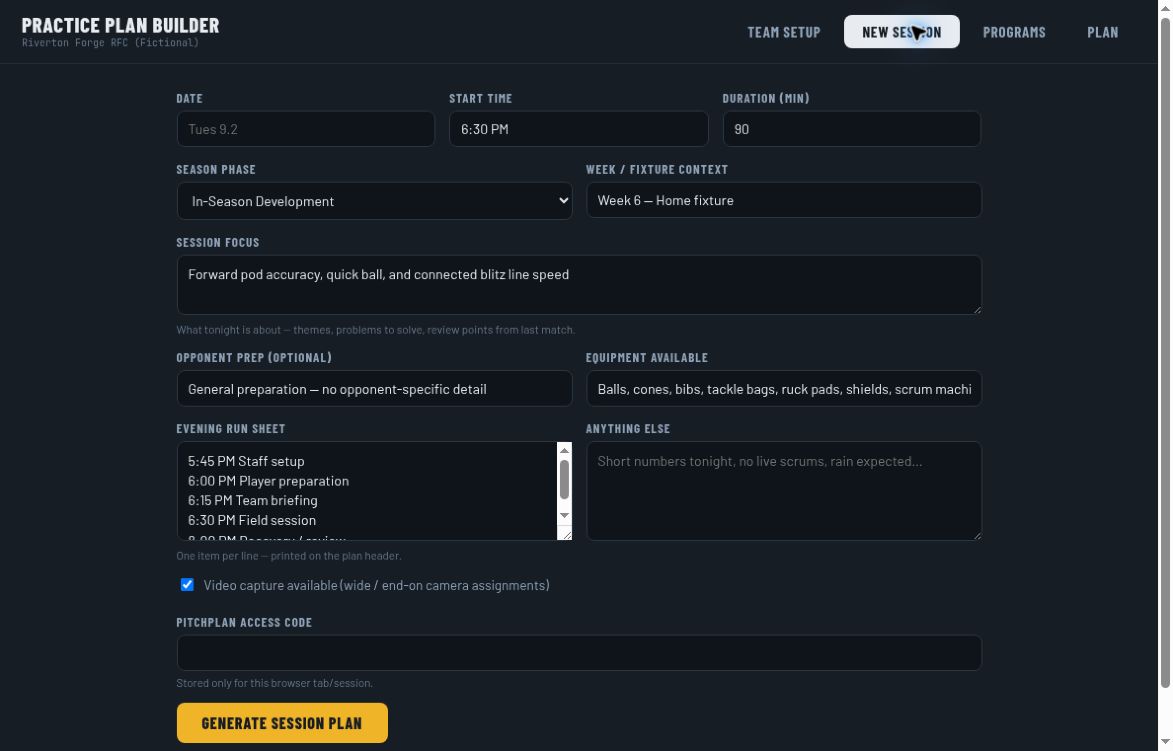
Session setup, captured September 30, 2026
View full screenshot04 / SIDELINE CAPTURE
Voice Stats
Built prototype · Rugby V1Capture the event. Keep the correction easy.
The rugby stats prototype combines voice recognition with a text fallback, roster-based stat tables, and an event ledger for review.
- The work
- Record events without making the sideline operator hunt through a spreadsheet.
- Built into the prototype
- Event review flags, voice/text corrections, manual stat adjustments, custom stats, and CSV export.
Workflow overview from the Rugby V1 prototype.
Prototype workflow · no microphone or data entry
HAVE A WORKFLOW IN MIND?